Twins Brother: The Bold, Friendly Font You Need to Use Correctly
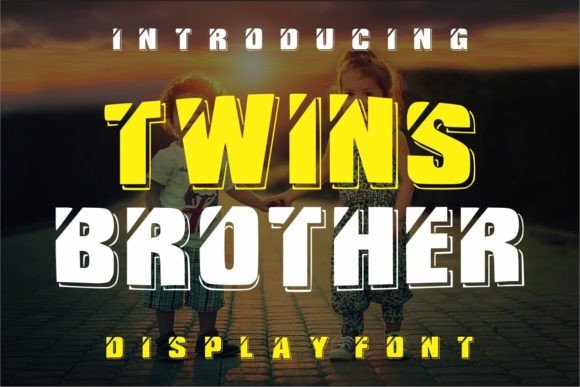
If you are looking for a typeface that instantly communicates warmth and playfulness, Twins Brother is an all-caps display font that stands out in a crowded digital landscape. Its rounded edges and bold strokes make it feel approachable, almost like a hand-drawn illustration brought to life. Whether you are designing a greeting card for a birthday, creating a logo for a children's brand, or adding flair to a presentation slide, this font has the potential to become your favorite tool for lighthearted projects. However, treating any display font as a "one-size-fits-all" solution is a common pitfall. To truly leverage the charm of Twins Brother without compromising your design's professionalism or readability, you need to understand its specific strengths and limitations.
Understanding the Character of Twins Brother
Before downloading or purchasing, it is essential to recognize exactly what kind of typographic voice Twins Brother brings to the table. It is not a serif font meant for body text, nor is it a sleek sans-serif designed for corporate annual reports. It is a display font, which means it is engineered to grab attention at larger sizes. The characters are thick, friendly, and fun, often mimicking the look of bubble letters or markers. This makes it incredibly effective for headlines, short phrases, and decorative elements where personality matters more than information density.
The appeal lies in its versatility across various creative sectors. Educators use it for classroom posters to make learning feel less rigid. Small business owners in the food and beverage industry apply it to menu boards to suggest a casual, welcoming atmosphere. Digital designers incorporate it into social media graphics to stop the scroll. Yet, despite its broad appeal, many users overlook the fundamental rule of typography: context dictates choice. Using Twins Brother in the wrong setting can unintentionally undermine your message, making a serious announcement seem trivial or a complex instruction appear confusing.
Common Mistakes That Dilute Your Design
One of the most frequent errors creators make with Twins Brother is using it for long blocks of text. Because the font is entirely uppercase and features heavy, rounded strokes, reading a paragraph in this style causes significant eye strain. The brain struggles to distinguish between words when they all share the same visual weight and lack the ascenders and descenders found in mixed-case fonts. If you attempt to write a blog post, a product description, or even a detailed invitation in Twins Brother, you risk losing your audience before they finish the first sentence.
Another overlooked detail involves pairing. Many beginners assume that because Twins Brother is bold, it needs to be paired with another equally loud font. This creates visual chaos rather than harmony. When two dominant display fonts compete on the same page, neither gets the attention it deserves. Instead, the goal should be contrast. A better approach is to pair Twins Brother with a clean, neutral sans-serif or a simple serif for the body copy. This allows the headline to pop while ensuring the supporting text remains legible and professional.
Spacing is also a critical area where mistakes happen. The generous curves of the letters in Twins Brother require adequate letter-spacing (kerning) to breathe. If you squeeze the characters too tightly, the round shapes can merge visually, making the text look like a blob rather than distinct words. Conversely, spacing them too far apart can break the flow of the word, making it difficult to read quickly. Finding the sweet spot requires testing the font at the actual size you intend to use it, rather than relying on default settings.
How Poor Application Affects Your Results
These seemingly minor decisions have tangible impacts on your work. When a font is misused, it affects communication efficiency. If a customer cannot easily read your sign or website header, they may leave the site or walk past your store. In marketing, clarity is currency; if your message is obscured by poor typographic choices, you lose potential conversions. Furthermore, inappropriate font usage can damage your brand perception. A law firm or a financial advisor using Twins Brother for their main branding might inadvertently signal a lack of seriousness or expertise, regardless of the quality of their services.
Cost and time are also factors. Spending hours tweaking a design only to realize the font choice was fundamentally flawed is a waste of resources. By understanding the limitations of Twins Brother upfront, you avoid the cycle of redesigning and reworking assets. Efficiency in design comes from knowing when a tool fits the job and when to put it back in the toolbox.
Practical Strategies for Better Typography
To get the most out of Twins Brother, start by defining the scope of its use. Limit its application to headlines, logos, pull quotes, or short captions where its personality shines. For example, imagine a flyer for a community craft fair. Using Twins Brother for the event title, "Summer Craft Fair," immediately sets a fun, inviting tone. However, the details about time, location, and ticket prices should be set in a highly readable secondary font. This combination ensures the design is both attractive and functional.
When evaluating whether to download or buy a license for Twins Brother, check the character set carefully. Some free versions of popular fonts may lack special characters, ligatures, or extended language support needed for your specific project. If you are creating content for a diverse audience or need specific symbols, ensure the version you acquire includes them. Additionally, consider the file format. For web use, web-optimized formats like WOFF2 are essential for fast loading times, while print projects require high-resolution outlines to maintain crisp edges.
Always test your design in real-world conditions. How does Twins Brother look on a mobile screen versus a printed poster? Does it remain legible when scaled down? Sometimes a font looks perfect on a large monitor but becomes unreadable on a small phone screen. Zooming in and out during the design process helps you catch these issues early. If the text starts to blur or lose definition, it is a sign that the font is too heavy for that particular size or medium.
What to Check Before Making a Decision
Before committing to Twins Brother for a major project, ask yourself three key questions. First, does the mood of the font match the intent of the message? If you are conveying urgency, danger, or strict formality, this friendly, rounded font is likely the wrong choice. Second, do I have a suitable companion font ready? Never select a display font without planning how it will interact with the rest of your text. Third, is the license appropriate for my intended use? Ensure you have the rights to use the font commercially if it is for a client or a product you plan to sell.
By approaching Twins Brother with intention and awareness, you transform it from just another download into a strategic asset. It offers a unique blend of boldness and friendliness that few other fonts can match, provided you respect its role as a display typeface. Avoid the trap of overuse, prioritize readability, and focus on creating a balanced hierarchy in your designs. When used correctly, Twins Brother doesn't just decorate your work; it enhances your communication, making your message memorable and engaging for your audience.